1. Get iBooks Author online and collaborative
Brilliant software! Never been easier for teachers and students to create amazing multi-touch iBooks and publish them to a global audience. The massive task of creating online software with sharing options would allow teachers to collaborate on books together in real time.
2. Get iTunes course manager mobile
iTunes U course manager can only be accessed currently through laptop and desktop. A mobile App would allow teachers to create on the go.
3. Promote iBook Store more
Some amazing resources being created by amazing teachers but still harder to reach going through the iBook App. Extra step makes it difficult and out of sight. Many teachers using the Apple ecosystem don't even know these valuable resources exist. Shame, as with new widgets being created daily the multi-loutch experience continues to improve.
Showing posts with label students. Show all posts
Showing posts with label students. Show all posts
Friday, 3 January 2014

Friday, 20 December 2013
Edtech ins and outs for the 2014 classroom
Some predictions, thoughts and ramblings. Might be wrong but these trends have been more evident during 2013 and can see them continuing throughout 2014.
1.
In:
Cordless technology that allows teachers and students more flexibility and mobility. Technology like Apple TV will enable teachers and students the opportunity to share, collaborate and get mobile. It will also allow other teachers and staff to walk into a room without needing specific cords, software and training to use.

Out:
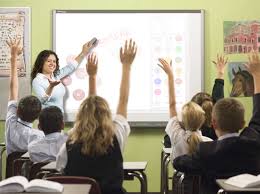
IWBs rely too much on a teacher focus and can encourage teachers and students to use technology to bring about more "chalk and talk" "But it's so engaging"...has lost its power as the students are often engaged in the technology and not the learning. The push to get more mobile, cordless and create flexible learning spaces will see the continue decrease in IWBs in classrooms across the globe. The focus will be getting more technology in the hands of the students. Less students watching and more students actively creating!
2.
In
Students creating their own digital games through learning to code:
The #hourofcode was just the beginning and teachers and students have got a taste for it. Students creating and learning code will continue to flourish. Teachers have seen the benefits and watched their students learning to think. A whole new generation of coders will develop.
Out
Students playing games:
Still some benefits but the push to get students creating content in classrooms will see this decrease. This does not mean creative, world building games won't continue to gain momentum.
3.
In
Augmented Reality using real life images as triggers:
As the technology develops we will start to see an explosion of Apps like Layer and Aurasma in classrooms (if we haven't already). The rise of Augmented Reality in the past 12 months has been massive. Teachers and students will start to hone their skills, creating more effective AR experiences!

Out
QR codes
For those who are too lazy to do Augmented Reality well? Only kidding. Still many benefits but the effect of connecting real life trigger images with persuasive overlays has to be the next step.

1.
In:
Cordless technology that allows teachers and students more flexibility and mobility. Technology like Apple TV will enable teachers and students the opportunity to share, collaborate and get mobile. It will also allow other teachers and staff to walk into a room without needing specific cords, software and training to use.

Out:
IWBs rely too much on a teacher focus and can encourage teachers and students to use technology to bring about more "chalk and talk" "But it's so engaging"...has lost its power as the students are often engaged in the technology and not the learning. The push to get more mobile, cordless and create flexible learning spaces will see the continue decrease in IWBs in classrooms across the globe. The focus will be getting more technology in the hands of the students. Less students watching and more students actively creating!
2.
In
Students creating their own digital games through learning to code:
The #hourofcode was just the beginning and teachers and students have got a taste for it. Students creating and learning code will continue to flourish. Teachers have seen the benefits and watched their students learning to think. A whole new generation of coders will develop.
Out
Students playing games:
Still some benefits but the push to get students creating content in classrooms will see this decrease. This does not mean creative, world building games won't continue to gain momentum.
3.
In
Augmented Reality using real life images as triggers:
As the technology develops we will start to see an explosion of Apps like Layer and Aurasma in classrooms (if we haven't already). The rise of Augmented Reality in the past 12 months has been massive. Teachers and students will start to hone their skills, creating more effective AR experiences!
Out
QR codes
For those who are too lazy to do Augmented Reality well? Only kidding. Still many benefits but the effect of connecting real life trigger images with persuasive overlays has to be the next step.

About Paul:
2013 Finalist - International EdTech Digest Awards Recognition Program honoring tools, trendsetters and leaders in the education and technology sector. The distinguished awards program recognizes outstanding solutions―and the best and brightest minds―in education and technology.
2013 Nominee - EduBlogs Life Time achievement award.
Apple Distinguished Educator Class of 2013. Paul is a leader in the implementation of Augmented Reality in schools to improve learning outcomes, Professional Development of staff with integration of ICTs, and has expertise in the implementation of mobile devices into pedagogical frameworks.
Creator
The Tellagami Project (Presentation)
Teaching students to code on the iPad (iBook)
Augmented Reality in Education (iBook)
10 Amazing lessons for the iPad Classroom (iBook)
Formative Feedback for Learning and Science AR (Apps)
"Paul, you are a real Leader" - Dr Heidi Hayes Jacobs, author and internationally recognized education leader known for her work in curriculum mapping, curriculum integration and developing 21st century approaches to teaching and learning.
"Paul we designed iBooks Author to be a tool that teachers could use to create content that they develop for the classroom and can share with the world. It is great Paul that you have been using it that way to great success." - Philip Schiller - Apple’s Senior Vice President of Worldwide Marketing.
PUBLIC SPEAKING EXPERIENCE
Guest Speaker - Best Apps for Kids - State Library Queensland 2013
National Leading a Digital School Conference - 2013 (Melbourne)
Augmented Reality in Education
21st Century Skills v Technology
IWB Interactive Teaching and Learning Conference - Sydney 2012
The benefits of teaching game design and strategy.
Technology and Formative Assessment strategies.
2013 Nominee - EduBlogs Life Time achievement award.
Apple Distinguished Educator Class of 2013. Paul is a leader in the implementation of Augmented Reality in schools to improve learning outcomes, Professional Development of staff with integration of ICTs, and has expertise in the implementation of mobile devices into pedagogical frameworks.
Creator
The Tellagami Project (Presentation)
Teaching students to code on the iPad (iBook)
Augmented Reality in Education (iBook)
10 Amazing lessons for the iPad Classroom (iBook)
Formative Feedback for Learning and Science AR (Apps)
"Paul, you are a real Leader" - Dr Heidi Hayes Jacobs, author and internationally recognized education leader known for her work in curriculum mapping, curriculum integration and developing 21st century approaches to teaching and learning.
"Paul we designed iBooks Author to be a tool that teachers could use to create content that they develop for the classroom and can share with the world. It is great Paul that you have been using it that way to great success." - Philip Schiller - Apple’s Senior Vice President of Worldwide Marketing.
PUBLIC SPEAKING EXPERIENCE
Guest Speaker - Best Apps for Kids - State Library Queensland 2013
National Leading a Digital School Conference - 2013 (Melbourne)
Augmented Reality in Education
21st Century Skills v Technology
IWB Interactive Teaching and Learning Conference - Sydney 2012
The benefits of teaching game design and strategy.
Technology and Formative Assessment strategies.
Saturday, 14 December 2013
The reflective student
As a teacher what do you notice when you hand a test back? Do students look straight for the Grade (letter) or do they look through mistakes, reflecting on what went wrong and what they need to do better next time?
I think you would all agree we would prefer students to do the latter, but experience tells us they do the first option.
So how do we get students reflecting on learning experiences? With mobile technology there has never been a better time to foster a culture of analysis and reflection.
Here are 2 quick tutorials using the Book Creator App and the Explain Everything App for iPad to encourage more reflective students in your class.
Reflective student - Explain Everything tutorial:
Reflective student - Book Creator tutorial:
About Paul:
2013 Finalist - International EdTech Digest Awards Recognition Program honoring tools, trendsetters and leaders in the education and technology sector. The distinguished awards program recognizes outstanding solutions―and the best and brightest minds―in education and technology.
2013 Nominee - EduBlogs Life Time achievement award.
Apple Distinguished Educator Class of 2013. Paul is a leader in the implementation of Augmented Reality in schools to improve learning outcomes, Professional Development of staff with integration of ICTs, and has expertise in the implementation of mobile devices into pedagogical frameworks.
Creator
The Tellagami Project (Presentation)
Teaching students to code on the iPad (iBook)
Augmented Reality in Education (iBook)
10 Amazing lessons for the iPad Classroom (iBook)
Formative Feedback for Learning and Science AR (Apps)
"Paul, you are a real Leader" - Dr Heidi Hayes Jacobs, author and internationally recognized education leader known for her work in curriculum mapping, curriculum integration and developing 21st century approaches to teaching and learning.
"Paul we designed iBooks Author to be a tool that teachers could use to create content that they develop for the classroom and can share with the world. It is great Paul that you have been using it that way to great success." - Philip Schiller - Apple’s Senior Vice President of Worldwide Marketing.
PUBLIC SPEAKING EXPERIENCE
Guest Speaker - Best Apps for Kids - State Library Queensland 2013
National Leading a Digital School Conference - 2013 (Melbourne)
Augmented Reality in Education
21st Century Skills v Technology
IWB Interactive Teaching and Learning Conference - Sydney 2012
The benefits of teaching game design and strategy.
Technology and Formative Assessment strategies.
2013 Nominee - EduBlogs Life Time achievement award.
Apple Distinguished Educator Class of 2013. Paul is a leader in the implementation of Augmented Reality in schools to improve learning outcomes, Professional Development of staff with integration of ICTs, and has expertise in the implementation of mobile devices into pedagogical frameworks.
Creator
The Tellagami Project (Presentation)
Teaching students to code on the iPad (iBook)
Augmented Reality in Education (iBook)
10 Amazing lessons for the iPad Classroom (iBook)
Formative Feedback for Learning and Science AR (Apps)
"Paul, you are a real Leader" - Dr Heidi Hayes Jacobs, author and internationally recognized education leader known for her work in curriculum mapping, curriculum integration and developing 21st century approaches to teaching and learning.
"Paul we designed iBooks Author to be a tool that teachers could use to create content that they develop for the classroom and can share with the world. It is great Paul that you have been using it that way to great success." - Philip Schiller - Apple’s Senior Vice President of Worldwide Marketing.
PUBLIC SPEAKING EXPERIENCE
Guest Speaker - Best Apps for Kids - State Library Queensland 2013
National Leading a Digital School Conference - 2013 (Melbourne)
Augmented Reality in Education
21st Century Skills v Technology
IWB Interactive Teaching and Learning Conference - Sydney 2012
The benefits of teaching game design and strategy.
Technology and Formative Assessment strategies.
Tuesday, 19 November 2013
5 activities all students should use iPads for
1. Learning journals
Still one of the most powerful activities I have ever given my students. Challenging and confronting at times but so effective. When do children have the time to sit down and reflect on what they have learnt and what they have struggled with? Do you really think tests do this. Take a look at Learning Journals.
http://www.youtube.com/watch?v=Y3QfgF1HahI
2. Learning to Code
Watching a kid code is like watching them think! There has never been a better time to teach kids to code on mobile devices. Hopscotch and GamePress two of my favourites.
http://www.youtube.com/watch?v=KU1WOuvMh4I
https://itunes.apple.com/au/book/teaching-students-to-code/id729919770?mt=11&ls=1
3. Reading Response activities
Too much pen and paper! Doesn't fully show what students know or what they are thinking. Allow students to respond to text with pictures, video and audio.
http://www.youtube.com/watch?v=OIYrN5OMT2I
http://www.youtube.com/watch?v=y-ujNMUedD4
4. Creating Multi-Media presentations
The iPad is not a computer, so stop using it like one. Utilise the plethora of effective Apps like Explain Everything so that students can create presentations that are effective and engaging for the audience. Not only that but multi-modal presentations often show a deep level of understanding.
http://www.youtube.com/watch?v=4mB-hiFqfAw
http://www.youtube.com/watch?v=NaPYls4TUmo
5. Collaborating with other students
Being mobile and having access to collaboration tools such as Google Docs presents a range of new opportunities for students to collaborate with each other. Imagine taking video during a Science field trip and collaborating with a scientist on the other side of the world?
Still one of the most powerful activities I have ever given my students. Challenging and confronting at times but so effective. When do children have the time to sit down and reflect on what they have learnt and what they have struggled with? Do you really think tests do this. Take a look at Learning Journals.
http://www.youtube.com/watch?v=Y3QfgF1HahI
2. Learning to Code
Watching a kid code is like watching them think! There has never been a better time to teach kids to code on mobile devices. Hopscotch and GamePress two of my favourites.
http://www.youtube.com/watch?v=KU1WOuvMh4I
https://itunes.apple.com/au/book/teaching-students-to-code/id729919770?mt=11&ls=1
3. Reading Response activities
Too much pen and paper! Doesn't fully show what students know or what they are thinking. Allow students to respond to text with pictures, video and audio.
http://www.youtube.com/watch?v=OIYrN5OMT2I
http://www.youtube.com/watch?v=y-ujNMUedD4
4. Creating Multi-Media presentations
The iPad is not a computer, so stop using it like one. Utilise the plethora of effective Apps like Explain Everything so that students can create presentations that are effective and engaging for the audience. Not only that but multi-modal presentations often show a deep level of understanding.
http://www.youtube.com/watch?v=4mB-hiFqfAw
http://www.youtube.com/watch?v=NaPYls4TUmo
5. Collaborating with other students
Being mobile and having access to collaboration tools such as Google Docs presents a range of new opportunities for students to collaborate with each other. Imagine taking video during a Science field trip and collaborating with a scientist on the other side of the world?
Friday, 8 November 2013
Hour of Code just the beginning
With the momentum building in the lead up to Computer Science Week in the States and Hour of Code, I can't help thinking this is just the beginning. What makes me think this? For the past 12 months I have been teaching my students to Code and I have seen the benefits first hand. Rich, deep level thinking, the collaboration, and the ability to see Code come alive are just some of the reasons all students should learn to code in schools.
On the 9th December (and the lead up week) there is a massive push to get kids coding. I think the success of this week and what follows is dependent on an element we have not placed a higher enough priority on - the teachers. See without passionate teachers who believe in coding we will not produce passionate students. The teacher is not the only ingredient, but certainly an important one.
Paul is the Author of the upcoming iBook "Teaching students to code on the iPad".

On the 9th December (and the lead up week) there is a massive push to get kids coding. I think the success of this week and what follows is dependent on an element we have not placed a higher enough priority on - the teachers. See without passionate teachers who believe in coding we will not produce passionate students. The teacher is not the only ingredient, but certainly an important one.
Paul is the Author of the upcoming iBook "Teaching students to code on the iPad".
Sunday, 27 October 2013
3 awesome iPad Apps to get kids coding
The language of Code is a universal language. We use technology almost every minute of everyday and yet we remain ignorant of how technology actually works. What drives this technology? Code!
With iPads being so popular in schools across the globe what are some iPad Apps that will get kids coding around the world.
1.Daisy the Dinosaur

2.Hopscotch
Hopscotch works by dragging and dropping blocks of code. Build little routines and press play to see your code in action! As you get more advanced, you can add more objects and run your code using events like shaking and tilting the iPad or even shouting at the iPad! We were heavily inspired by MIT's Scratch.
Many of the best coders fell in love with programming as kids at the age of 8, 10 and 12 years old. With Hopscotch, kids can build and perfect their own creations while obtaining an understanding of the fundamentals of computer science.
 3. GamePress
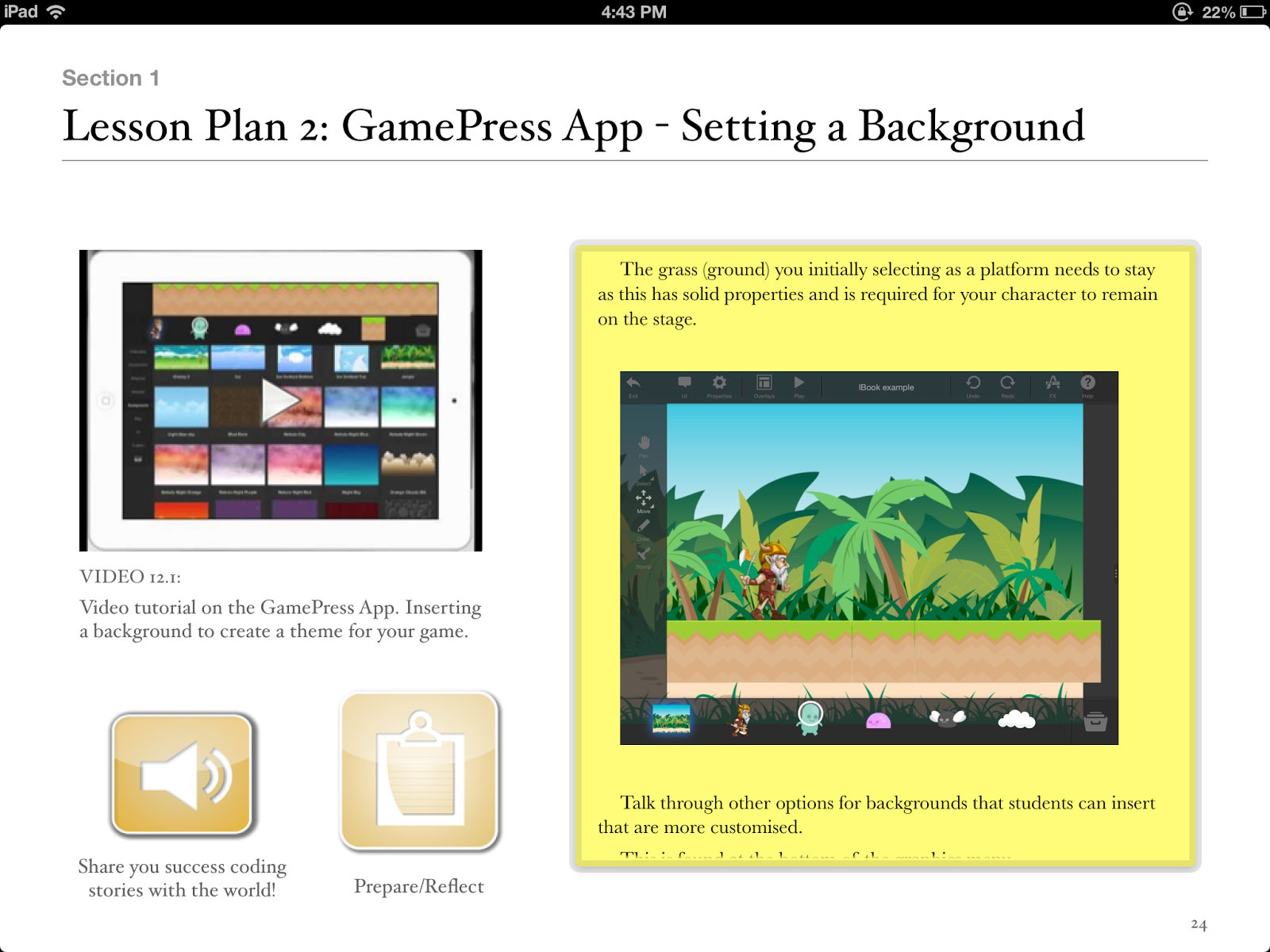
Teachers, you can make use of GamePress to teach students about game design, logic and even computer science and engineering! The no programming interface makes learning complex concepts fun and easy. Games have become more than just a way to pass time, they’re perfect for education and learning new things.

Paul is a:
2013 Finalist - International EdTech Digest Awards Recognition Program honoring tools, trendsetters and leaders in the education and technology sector. The distinguished awards program recognizes outstanding solutions―and the best and brightest minds―in education and technology.
Apple Distinguished Educator Class of 2013. Paul is a leader in the implementation of Augmented Reality in schools to improve learning outcomes, Professional Development of staff with integration of ICTs, and has expertise in the implementation of mobile devices into pedagogical frameworks.
Creator
The Tellagami Project (Presentation)
Teaching students to code on the iPad (iBook)
Augmented Reality in Education (iBook)
10 Amazing lessons for the iPad Classroom (iBook)
Formative Feedback for Learning and Science AR (Apps)
"Paul, you are a real Leader" - Dr Heidi Hayes Jacobs, author and internationally recognized education leader known for her work in curriculum mapping, curriculum integration and developing 21st century approaches to teaching and learning.
"Paul we designed iBooks Author to be a tool that teachers could use to create content that they develop for the classroom and can share with the world. It is great Paul that you have been using it that way to great success." - Philip Schiller - Apple’s Senior Vice President of Worldwide Marketing.
PUBLIC SPEAKING EXPERIENCE
Guest Speaker - Best Apps for Kids - State Library Queensland 2013
National Leading a Digital School Conference - 2013 (Melbourne)
Augmented Reality in Education
21st Century Skills v Technology
IWB Interactive Teaching and Learning Conference - Sydney 2012
The benefits of teaching game design and strategy.
Technology and Formative Assessment strategies.
With iPads being so popular in schools across the globe what are some iPad Apps that will get kids coding around the world.
1.Daisy the Dinosaur
Description
Learn the basics of computer programming with Daisy the Dinosaur! This free, fun app has an easy drag and drop interface that kids of all ages can use to animate Daisy to dance across the screen. Kids will intuitively grasp the basics of objects, sequencing, loops and events by solving this app's challenges. After playing Daisy, kids can choose to download a kit to program their own computer game.
2.Hopscotch
Description
Hopscotch works by dragging and dropping blocks of code. Build little routines and press play to see your code in action! As you get more advanced, you can add more objects and run your code using events like shaking and tilting the iPad or even shouting at the iPad! We were heavily inspired by MIT's Scratch.
Many of the best coders fell in love with programming as kids at the age of 8, 10 and 12 years old. With Hopscotch, kids can build and perfect their own creations while obtaining an understanding of the fundamentals of computer science.
Description
Teachers, you can make use of GamePress to teach students about game design, logic and even computer science and engineering! The no programming interface makes learning complex concepts fun and easy. Games have become more than just a way to pass time, they’re perfect for education and learning new things.
Paul is the author of Teaching students to code on the iPad .
2013 Finalist - International EdTech Digest Awards Recognition Program honoring tools, trendsetters and leaders in the education and technology sector. The distinguished awards program recognizes outstanding solutions―and the best and brightest minds―in education and technology.
Apple Distinguished Educator Class of 2013. Paul is a leader in the implementation of Augmented Reality in schools to improve learning outcomes, Professional Development of staff with integration of ICTs, and has expertise in the implementation of mobile devices into pedagogical frameworks.
Creator
The Tellagami Project (Presentation)
Teaching students to code on the iPad (iBook)
Augmented Reality in Education (iBook)
10 Amazing lessons for the iPad Classroom (iBook)
Formative Feedback for Learning and Science AR (Apps)
"Paul, you are a real Leader" - Dr Heidi Hayes Jacobs, author and internationally recognized education leader known for her work in curriculum mapping, curriculum integration and developing 21st century approaches to teaching and learning.
"Paul we designed iBooks Author to be a tool that teachers could use to create content that they develop for the classroom and can share with the world. It is great Paul that you have been using it that way to great success." - Philip Schiller - Apple’s Senior Vice President of Worldwide Marketing.
PUBLIC SPEAKING EXPERIENCE
Guest Speaker - Best Apps for Kids - State Library Queensland 2013
National Leading a Digital School Conference - 2013 (Melbourne)
Augmented Reality in Education
21st Century Skills v Technology
IWB Interactive Teaching and Learning Conference - Sydney 2012
The benefits of teaching game design and strategy.
Technology and Formative Assessment strategies.
Friday, 2 August 2013
Tellagami App applications
On Thursday I gave a PD on the Tellagami App. My staff then started brainstorming some applications for using Tellagami with their students in the classroom.
You see I believe the magic of Apps lies in the imagination of the teacher, not the App itself.
This is what the teachers came up with:
Literacy: reading responses to a set piece of text - photo of the text as background with types or spoken short responses, questioning (question stems) from a set text, summarising, reflecting and even reviewing through the lens of different audiences for the same text (girls vs boys, preps vs upper primary etc)
You see I believe the magic of Apps lies in the imagination of the teacher, not the App itself.
This is what the teachers came up with:
Mathematics - students take a photo of a specific shape or angle and then use as a background in Tellagami. Students then communicate through avatar the elements/characteristics of this shape/angle. Great way to demonstrate knowledge.
Science, field work. Take photo of creek, pollution.....and use App to give news report on what has happened and what is required to rectify.
What about getting guest speakers to email text and use Tellagami to do a virtual presentation??
Short narrative films, especially in Year 11 when students have to create a short film. Would be better to use recorded voice so we can leverage vocal qualities. Also useful in analytical tasks where students have to deconstruct representations of characters/places/events, etc.
Integration within the App “Explain Everything” - unlimited possibilities across multiple Learning Areas. Students could take a snapshot of a page in EE, using this as a background and then have the Tellagami introduce the topic/elaborate on a part or summarise at the
Science; predictions with reasoning or observations told by the tellagami and placed over images of investigations in process. An excellent chance for personal reflection post investigation too I think!
History; showing a comparison between two groups of people (Eg aboriginals and white settlers) - video documentary style presentation of the two opinions or perspectives of events in history?
Literacy: reading responses to a set piece of text - photo of the text as background with types or spoken short responses, questioning (question stems) from a set text, summarising, reflecting and even reviewing through the lens of different audiences for the same text (girls vs boys, preps vs upper primary etc)
Thursday, 13 June 2013
Youtube channel for ipad classroom ideas
Thanks to all my YOUTUBE subscribers. Make sure you keep checking on my latest teacher ipad tutorials on youtube - http://www.youtube.com/user/appsbypaulhamilton/videos
IPads in classrooms are revolutionary learning devices - but don't forget it is the teachers who make connections with the curriculum and look for unique ways of using Apps in all learning areas. Think outside the square everyone. An example of this is the Topia App. Why not use this World Building App to explore the Geography Curriculum. Big concepts like sustainability and Over population can be explored with students like never before.
Sunday, 9 June 2013
3 things that tell you your iPad program IS working
1. Your students are authoring and publishing content
Not playing educational games, not touching balloons that explode into number facts and not data processing huge amounts of content.
Instead - creating ebooks, multimedia presentations, podcasting, movie making and taking amazing photographs. Students are publishing for the local school community to view or publishing world wide.
2. Your students are integrating more than 1 App and suggesting App to the teachers
Students are jumping between the Camera App and Explain Everything to personalise projects and assignments. Students are embedding video and audio into Apps that results in rich media presentation.
Students are making connections between Apps they find and learning that is happening in the classroom.
3. Your teachers are talking Apps at lunchtime!
Teachers sharing WINS and great use of technology in the classroom. Teachers identifying and analysing Apps that are purposeful and hitting outcomes and the curriculum. Teachers are using a single App in a variety of different areas.
Not playing educational games, not touching balloons that explode into number facts and not data processing huge amounts of content.
Instead - creating ebooks, multimedia presentations, podcasting, movie making and taking amazing photographs. Students are publishing for the local school community to view or publishing world wide.
2. Your students are integrating more than 1 App and suggesting App to the teachers
Students are jumping between the Camera App and Explain Everything to personalise projects and assignments. Students are embedding video and audio into Apps that results in rich media presentation.
Students are making connections between Apps they find and learning that is happening in the classroom.
3. Your teachers are talking Apps at lunchtime!
Teachers sharing WINS and great use of technology in the classroom. Teachers identifying and analysing Apps that are purposeful and hitting outcomes and the curriculum. Teachers are using a single App in a variety of different areas.
Saturday, 8 June 2013
iPad Teacher Tutorial June Newsletter
What's the secret to an effective 1:1 program in schools? Devices? Infrastructure? User agreement? Whilst all of these areas play a role, the classroom TEACHER is the most important and significant ingredient in an effective 1:1 program. Let me be a little more specific. The teachers imagination and creativity, their ability to make connections with the device and applications, their knowledge of the curriculum and the 21st century students who sit in their class. See it is the teachers who see the hidden wonders/magic of an App like iMovie or a web2 tool like Todays Meet. This edition of the appsbypaulhamilton newsletter pays tribute to the creative and innovative teachers in our schools and the impact they are having on young minds across the globe.
Using iMovie in the classroom:
What better way to grab the attention of our students than with a movie trailer. Even better, get students creating narratives through iMovie. This tutorial looks at creating a Narrative using iMovie on an iPad.

Just recently I discovered the world of Podcasting and thought I would use it as a way of discovering great Apps that are out there. I plan to interview Teachers, App Developers and Parents but thought I would start by asking our target audience in this entire discussion: THE KIDS! As Dan Pink suggests we should talk with our students more about what they require/need at school. Here is the Talking Apps with Paul Hamilton first episode. In the first episode, I chat with my 8 year old daughter on her favourite Apps and how they could used at school. Email me if you would like to be on the next show.

Utilizing screen recording animations within an Augmented Reality environment:
Augmented Reality is starting to filter into classrooms across the globe. The Horizon Report is a yearly publication that highlights, analyzes and predicts the ways in which technological advances will change teaching, learning and creative inquiry. The 2013 report describes how and why augmented reality will play an important role in teaching and learning over the next two to three years. Luckily for educators Augmented Reality is available. Using 2 Apps (Aurasma and Explain Everything) you can create your own Augmented Reality experience for your students.

Interesting Observation:I often get frustrated with those who continue to see the iPad as a solely consuming device. We want our students creating and the iPad delivers creativity and content creation in spades. Our students are using technology differently than we did (and more of it). Anyone who has kids will notice this on a regular basis. As Sir Ken Robinson observes:
“When my son, James, was doing homework for school, he would have five or six windows open on his computer, Instant Messenger was flashing continuously, his cell phone was constantly ringing, and he was downloading music and watching the TV over his shoulder. I don’t know if he was doing any homework, but he was running an empire as far as I could see, so I didn’t really care.”
Students viewing Movies and posing questions:
I have no doubt that students viewing videos adds worth to the educational experience. However, how do we optimise the students experience so that we go further once the video is finished. Traditional note taking is limited. In my experience it is the posing of questions that we want our students to do so that they build a deeper understanding of the concepts. Also, allowing students to find and add content to the lesson needs to be encouraged. Using Today's Meet allows for this. Can students watch media and pose questions at the same time? Absolutely.

Using Video to give Formative Feedback:
Giving effective feedback to students has one of the highest impacts on student learning. As Professor John Hattie states: “Feedback is one of the most powerful influences on learning and achievement” and “This evidence shows that although feedback is among the major influences, the type of feedback and the way it is given can be differentially effective.”
In my experiences video feedback is one of these highly effective methods. Using video as a form of feedback allows: student-student feedback, teacher-student feedback and self feedback.

Upcoming Professional Development for School Leaders:
Looking forward to presenting at the Leading a Digital School conference at Crown Casino in Melbourne next term. My 2 sessions will be on Augmented Reality in Education and 21st Century Skills V Technology. Those who have a leadership position in schools should definitely attend!
For registration details visit:
The IWBNet website HERE
Free teacher tutorials.
Don't forget to check out my free teacher tutorial channel on youtube. It is approaching 40000 views and has plenty of useful and practical tutorials for teachers.

About Paul:
Apps and iBooks by Paul Hamilton


Tuesday, 14 May 2013
Thursday, 9 May 2013
Augmented Reality in Education iBook
Paul Hamilton has just published a free multi touch iBook on the use of Augmented Reality in Education. Outlining statistics, influences on the mind and practical tutorials for creating an AR experiences for students, this book is proving to be a valuable edition to your iBook library. And the best thing it is a FREE iBook.

Friday, 3 May 2013
Learning and the iPad
When looking at using iPads and Apps in education let's not forget about proven teaching methods and connect them to the technology we use in the classroom.

Subscribe to:
Posts (Atom)