1. Get iBooks Author online and collaborative
Brilliant software! Never been easier for teachers and students to create amazing multi-touch iBooks and publish them to a global audience. The massive task of creating online software with sharing options would allow teachers to collaborate on books together in real time.
2. Get iTunes course manager mobile
iTunes U course manager can only be accessed currently through laptop and desktop. A mobile App would allow teachers to create on the go.
3. Promote iBook Store more
Some amazing resources being created by amazing teachers but still harder to reach going through the iBook App. Extra step makes it difficult and out of sight. Many teachers using the Apple ecosystem don't even know these valuable resources exist. Shame, as with new widgets being created daily the multi-loutch experience continues to improve.
Showing posts with label iBook author. Show all posts
Showing posts with label iBook author. Show all posts
Friday, 3 January 2014

Friday, 29 November 2013
3 iPad/iPod Christmas activities for kids
How do we want students using iPads during the Christmas holidays?
How about creating, collaborating and communicating with Project based activities that will both engage, foster and develop 21st century skills whilst having an awesome time!
1. Create on comic/iBook on their favourite holiday moments
Incorporating the camera and Apps like Comic Life and Book Creator, our kids become authors at the same time. It also encourages kids to work together and involve the whole family.
Tutorials Here:
http://www.youtube.com/watch?v=znrlTHDzr6s
http://www.youtube.com/watch?v=ic5a2-qavFA
2. Time Lapse Photography iMovie
My girls are currently doing this as I write this Blog. The set up their iPod and use the App iMotion HD to take photos at 20 second intervals of the kids putting up the Christmas tree. They then drop into iMovie and add text and music to create an amazing time Lapse movie. Very cool.
Tutorials Here:
http://www.youtube.com/watch?v=eNU6JYW0tI0
http://www.youtube.com/watch?v=SGnIMp43fdU
3. Create a digital Video Game
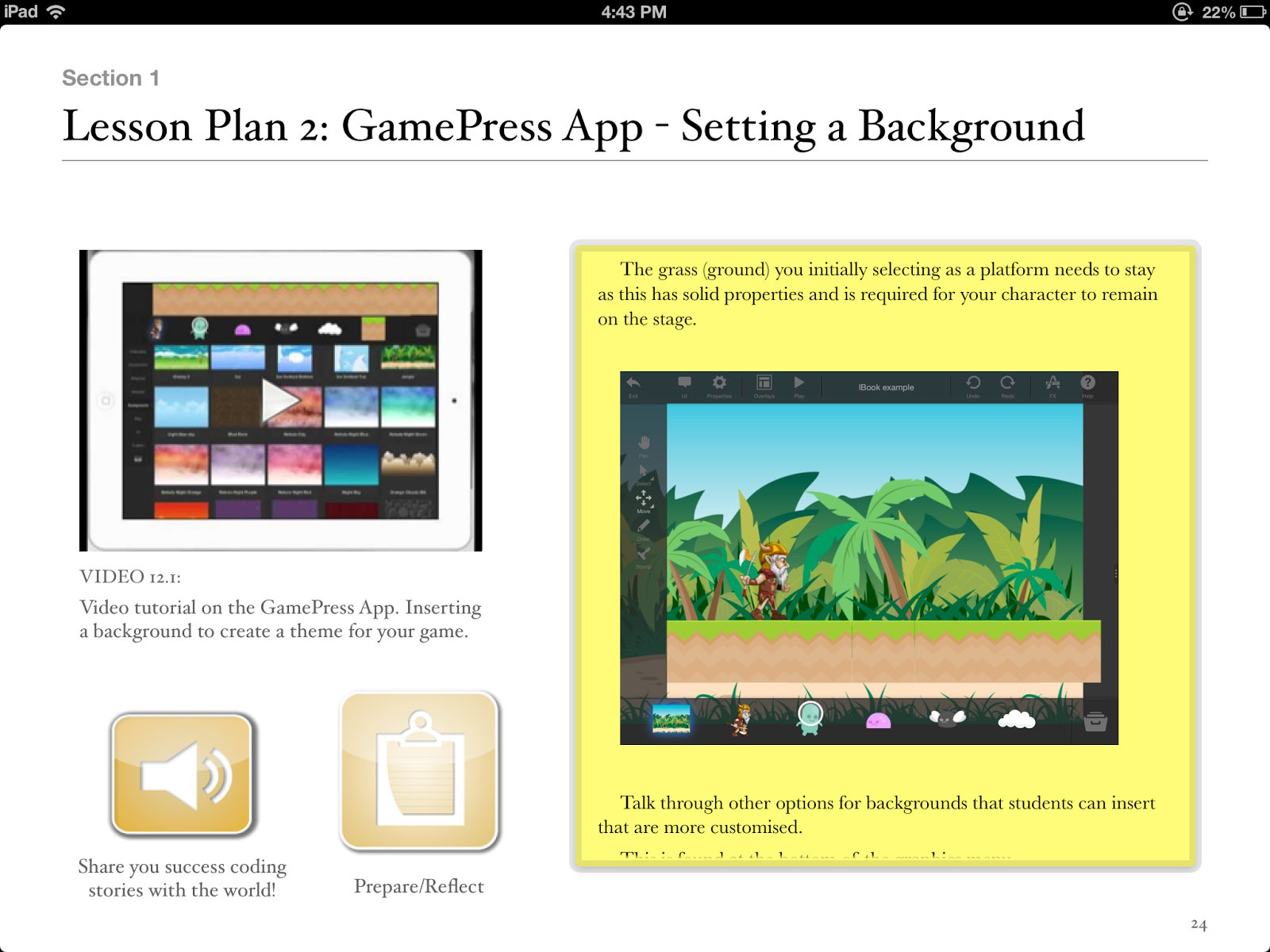
Using iPad Apps like Hopscotch and GamePress students can immerse themselves into the world of video games. But there is a difference! The kids can create their own, test, evaluate, work together and learn how to code at the same time. A really worthwhile activity!
Tutorials Here:
http://www.youtube.com/watch?v=_8-y0nIhmbY
http://www.youtube.com/watch?v=9SuFr_MUPUU
How about creating, collaborating and communicating with Project based activities that will both engage, foster and develop 21st century skills whilst having an awesome time!
1. Create on comic/iBook on their favourite holiday moments
Incorporating the camera and Apps like Comic Life and Book Creator, our kids become authors at the same time. It also encourages kids to work together and involve the whole family.
Tutorials Here:
http://www.youtube.com/watch?v=znrlTHDzr6s
http://www.youtube.com/watch?v=ic5a2-qavFA
2. Time Lapse Photography iMovie
My girls are currently doing this as I write this Blog. The set up their iPod and use the App iMotion HD to take photos at 20 second intervals of the kids putting up the Christmas tree. They then drop into iMovie and add text and music to create an amazing time Lapse movie. Very cool.
Tutorials Here:
http://www.youtube.com/watch?v=eNU6JYW0tI0
http://www.youtube.com/watch?v=SGnIMp43fdU
3. Create a digital Video Game
Using iPad Apps like Hopscotch and GamePress students can immerse themselves into the world of video games. But there is a difference! The kids can create their own, test, evaluate, work together and learn how to code at the same time. A really worthwhile activity!
Tutorials Here:
http://www.youtube.com/watch?v=_8-y0nIhmbY
http://www.youtube.com/watch?v=9SuFr_MUPUU
Sunday, 27 October 2013
3 awesome iPad Apps to get kids coding
The language of Code is a universal language. We use technology almost every minute of everyday and yet we remain ignorant of how technology actually works. What drives this technology? Code!
With iPads being so popular in schools across the globe what are some iPad Apps that will get kids coding around the world.
1.Daisy the Dinosaur

2.Hopscotch
Hopscotch works by dragging and dropping blocks of code. Build little routines and press play to see your code in action! As you get more advanced, you can add more objects and run your code using events like shaking and tilting the iPad or even shouting at the iPad! We were heavily inspired by MIT's Scratch.
Many of the best coders fell in love with programming as kids at the age of 8, 10 and 12 years old. With Hopscotch, kids can build and perfect their own creations while obtaining an understanding of the fundamentals of computer science.
 3. GamePress
Teachers, you can make use of GamePress to teach students about game design, logic and even computer science and engineering! The no programming interface makes learning complex concepts fun and easy. Games have become more than just a way to pass time, they’re perfect for education and learning new things.

Paul is a:
2013 Finalist - International EdTech Digest Awards Recognition Program honoring tools, trendsetters and leaders in the education and technology sector. The distinguished awards program recognizes outstanding solutions―and the best and brightest minds―in education and technology.
Apple Distinguished Educator Class of 2013. Paul is a leader in the implementation of Augmented Reality in schools to improve learning outcomes, Professional Development of staff with integration of ICTs, and has expertise in the implementation of mobile devices into pedagogical frameworks.
Creator
The Tellagami Project (Presentation)
Teaching students to code on the iPad (iBook)
Augmented Reality in Education (iBook)
10 Amazing lessons for the iPad Classroom (iBook)
Formative Feedback for Learning and Science AR (Apps)
"Paul, you are a real Leader" - Dr Heidi Hayes Jacobs, author and internationally recognized education leader known for her work in curriculum mapping, curriculum integration and developing 21st century approaches to teaching and learning.
"Paul we designed iBooks Author to be a tool that teachers could use to create content that they develop for the classroom and can share with the world. It is great Paul that you have been using it that way to great success." - Philip Schiller - Apple’s Senior Vice President of Worldwide Marketing.
PUBLIC SPEAKING EXPERIENCE
Guest Speaker - Best Apps for Kids - State Library Queensland 2013
National Leading a Digital School Conference - 2013 (Melbourne)
Augmented Reality in Education
21st Century Skills v Technology
IWB Interactive Teaching and Learning Conference - Sydney 2012
The benefits of teaching game design and strategy.
Technology and Formative Assessment strategies.
With iPads being so popular in schools across the globe what are some iPad Apps that will get kids coding around the world.
1.Daisy the Dinosaur
Description
Learn the basics of computer programming with Daisy the Dinosaur! This free, fun app has an easy drag and drop interface that kids of all ages can use to animate Daisy to dance across the screen. Kids will intuitively grasp the basics of objects, sequencing, loops and events by solving this app's challenges. After playing Daisy, kids can choose to download a kit to program their own computer game.
2.Hopscotch
Description
Hopscotch works by dragging and dropping blocks of code. Build little routines and press play to see your code in action! As you get more advanced, you can add more objects and run your code using events like shaking and tilting the iPad or even shouting at the iPad! We were heavily inspired by MIT's Scratch.
Many of the best coders fell in love with programming as kids at the age of 8, 10 and 12 years old. With Hopscotch, kids can build and perfect their own creations while obtaining an understanding of the fundamentals of computer science.
Description
Teachers, you can make use of GamePress to teach students about game design, logic and even computer science and engineering! The no programming interface makes learning complex concepts fun and easy. Games have become more than just a way to pass time, they’re perfect for education and learning new things.
Paul is the author of Teaching students to code on the iPad .
2013 Finalist - International EdTech Digest Awards Recognition Program honoring tools, trendsetters and leaders in the education and technology sector. The distinguished awards program recognizes outstanding solutions―and the best and brightest minds―in education and technology.
Apple Distinguished Educator Class of 2013. Paul is a leader in the implementation of Augmented Reality in schools to improve learning outcomes, Professional Development of staff with integration of ICTs, and has expertise in the implementation of mobile devices into pedagogical frameworks.
Creator
The Tellagami Project (Presentation)
Teaching students to code on the iPad (iBook)
Augmented Reality in Education (iBook)
10 Amazing lessons for the iPad Classroom (iBook)
Formative Feedback for Learning and Science AR (Apps)
"Paul, you are a real Leader" - Dr Heidi Hayes Jacobs, author and internationally recognized education leader known for her work in curriculum mapping, curriculum integration and developing 21st century approaches to teaching and learning.
"Paul we designed iBooks Author to be a tool that teachers could use to create content that they develop for the classroom and can share with the world. It is great Paul that you have been using it that way to great success." - Philip Schiller - Apple’s Senior Vice President of Worldwide Marketing.
PUBLIC SPEAKING EXPERIENCE
Guest Speaker - Best Apps for Kids - State Library Queensland 2013
National Leading a Digital School Conference - 2013 (Melbourne)
Augmented Reality in Education
21st Century Skills v Technology
IWB Interactive Teaching and Learning Conference - Sydney 2012
The benefits of teaching game design and strategy.
Technology and Formative Assessment strategies.
Tuesday, 22 October 2013
Teaching students to code on the iPad iBook Released
The language of Code is a universal language. We use technology almost every minute of everyday and yet we remain ignorant of how technology actually works. What drives this technology? Code!
This ebook aims to give the power back to the teachers and students. Code is easy and with some step by step instructions we can introduce the language of code to the students who sit in our classrooms.
Structured lesson plans combined with simple and easy to follow video tutorials, will allow teachers to introduce coding lessons in a fun and non threatening manner.
With a focus on collaborative learning, “Teaching Students to Code on the iPad” works! It drifts away from a teacher focussed model, allowing students to develop Coding skills at their own rate and allows teachers to facilitate the learning to a greater extent.
iBook can be purchased here:
https://itunes.apple.com/au/book/teaching-students-to-code/id729919770?mt=11&ls=1
Hour of Code supported with this iBook.
This ebook aims to give the power back to the teachers and students. Code is easy and with some step by step instructions we can introduce the language of code to the students who sit in our classrooms.
Structured lesson plans combined with simple and easy to follow video tutorials, will allow teachers to introduce coding lessons in a fun and non threatening manner.
With a focus on collaborative learning, “Teaching Students to Code on the iPad” works! It drifts away from a teacher focussed model, allowing students to develop Coding skills at their own rate and allows teachers to facilitate the learning to a greater extent.
iBook can be purchased here:
https://itunes.apple.com/au/book/teaching-students-to-code/id729919770?mt=11&ls=1
Hour of Code supported with this iBook.
Thursday, 26 September 2013
3 things students should be doing on iPads
My primary job is advising and coaching teachers to use technology in effective ways in classrooms. iPads as a technological tool in classrooms is a major part of this job. Researching effective Apps, encouraging teachers to look for connections between the curriculums and integration of these amazing devices are just 2 aspects of my job that are both challenging and incredible rewarding.
So, what are some things our students should be doing on iPads? Here are some thoughts.
1). Authoring and Publishing digital content.
Utilising Apps such as Book Creator, allows students to become authors and publishers. With a little research there is nothing stopping students publishing to the world! iBooks continues to be an under utilised App in schools.

2). Creating Multi-Modal Presentations.
Using an App like Explain Everything, students can now present and demonstrate knowledge in a variety of ways. Students who struggle with literacy can show teachers through videos and audio that there is a wealth of knowledge they have and want to share.

3). Learning to Code.
Using Apps like Hopscotch and GamePress, students can create and publish digital games and learn the language of Code at the same time. With a little structure, students can collaborate with others so that lessons are not teacher centred, allowing students to spread their wings and learn at an appropriate rate.

Paul
About Paul Hamilton, Author of this Blog:
2013 Finalist - International EdTech Digest Awards Recognition Program honoring tools, trendsetters and leaders in the education and technology sector. The distinguished awards program recognizes outstanding solutions―and the best and brightest minds―in education and technology.
Apple Distinguished Educator Class of 2013. Paul is a leader in the implementation of Augmented Reality in schools to improve learning outcomes, Professional Development of staff with integration of ICTs, and has expertise in the implementation of mobile devices into pedagogical frameworks.
Creator
The Tellagami Project (Presentation)
Augmented Reality in Education (iBook)
10 Amazing lessons for the iPad Classroom (iBook)
Formative Feedback for Learning and Science AR (Apps)
"Paul, you are a real Leader" - Dr Heidi Hayes Jacobs, author and internationally recognized education leader known for her work in curriculum mapping, curriculum integration and developing 21st century approaches to teaching and learning.
"Paul we designed iBooks Author to be a tool that teachers could use to create content that they develop for the classroom and can share with the world. It is great Paul that you have been using it that way to great success." - Philip Schiller - Apple’s Senior Vice President of Worldwide Marketing.
PUBLIC SPEAKING EXPERIENCE
Guest Speaker - Best Apps for Kids - State Library Queensland 2013
National Leading a Digital School Conference - 2013 (Melbourne)
Augmented Reality in Education
21st Century Skills v Technology
IWB Interactive Teaching and Learning Conference - Sydney 2012
The benefits of teaching game design and strategy.
Technology and Formative Assessment strategies.
So, what are some things our students should be doing on iPads? Here are some thoughts.
1). Authoring and Publishing digital content.
Utilising Apps such as Book Creator, allows students to become authors and publishers. With a little research there is nothing stopping students publishing to the world! iBooks continues to be an under utilised App in schools.

2). Creating Multi-Modal Presentations.
Using an App like Explain Everything, students can now present and demonstrate knowledge in a variety of ways. Students who struggle with literacy can show teachers through videos and audio that there is a wealth of knowledge they have and want to share.

3). Learning to Code.
Using Apps like Hopscotch and GamePress, students can create and publish digital games and learn the language of Code at the same time. With a little structure, students can collaborate with others so that lessons are not teacher centred, allowing students to spread their wings and learn at an appropriate rate.

Paul
About Paul Hamilton, Author of this Blog:
2013 Finalist - International EdTech Digest Awards Recognition Program honoring tools, trendsetters and leaders in the education and technology sector. The distinguished awards program recognizes outstanding solutions―and the best and brightest minds―in education and technology.
Apple Distinguished Educator Class of 2013. Paul is a leader in the implementation of Augmented Reality in schools to improve learning outcomes, Professional Development of staff with integration of ICTs, and has expertise in the implementation of mobile devices into pedagogical frameworks.
Creator
The Tellagami Project (Presentation)
Augmented Reality in Education (iBook)
10 Amazing lessons for the iPad Classroom (iBook)
Formative Feedback for Learning and Science AR (Apps)
"Paul, you are a real Leader" - Dr Heidi Hayes Jacobs, author and internationally recognized education leader known for her work in curriculum mapping, curriculum integration and developing 21st century approaches to teaching and learning.
"Paul we designed iBooks Author to be a tool that teachers could use to create content that they develop for the classroom and can share with the world. It is great Paul that you have been using it that way to great success." - Philip Schiller - Apple’s Senior Vice President of Worldwide Marketing.
PUBLIC SPEAKING EXPERIENCE
Guest Speaker - Best Apps for Kids - State Library Queensland 2013
National Leading a Digital School Conference - 2013 (Melbourne)
Augmented Reality in Education
21st Century Skills v Technology
IWB Interactive Teaching and Learning Conference - Sydney 2012
The benefits of teaching game design and strategy.
Technology and Formative Assessment strategies.
Tuesday, 9 July 2013
appsbypaulhamilton youtube channel
We are about to hit 40,000 views and 300 subscribers. Don't hesitate to pass on the website to other educators out there using iPads on the classroom. Thanks everyone. http://www.youtube.com/user/appsbypaulhamilton/videos
Friday, 5 July 2013
iBook for the iPad classroom hits no1
Thanks to all the support. Proud to announce 10 amazing lessons for the iPad classroom has been top of the Computing and Internet category on the iBook Store (Australian Store) since its release.
Hopefully teachers are getting lots out of it and the students in their classrooms more engaged!!

Hopefully teachers are getting lots out of it and the students in their classrooms more engaged!!
Tuesday, 2 July 2013
10 amazing lessons for the iPad Classroom
10 amazing lessons for the iPad Classroom is now available on the iBook Store. Lessons and Apps include: CLICK HERE
Using the Topia App to explore Geography Concepts
Using the Trading Cards App to build knowledge
Using the Tellagami App to develop reading fluency
Using the Hopscotch App to develop thinking processes
Using Formative Feedback for Learning App to encourage feedback giving between students and teachers
Using Explain Everything to compare website data
Using Book Creator to Author and Publish content
Using Doodle Cast App to tell stories and develop communication skills
Using Comic Life App to reflect on past experiences and to teach a recount structure

Using the Topia App to explore Geography Concepts
Using the Trading Cards App to build knowledge
Using the Tellagami App to develop reading fluency
Using the Hopscotch App to develop thinking processes
Using Formative Feedback for Learning App to encourage feedback giving between students and teachers
Using Explain Everything to compare website data
Using Book Creator to Author and Publish content
Using Doodle Cast App to tell stories and develop communication skills
Using Comic Life App to reflect on past experiences and to teach a recount structure
Friday, 28 June 2013
10 amazing lessons for the iPad Classroom: iBook coming soon
Sneak Peek at my new iBook out July 4th, 2013 on the iTunes iBook Store. Will include detailed lesson plans and in depth video tutorials for the teachers.
“For the first time in history, we have a technological device that is so intuitive to young children, that the educational possibilities are endless. No longer is technology a hindrance to student learning. However, teachers are struggling to make connections between Apps, the Curriculum and 21st Century Skills”.
First 4 lessons outlined in the iBook:Lesson 1:
Use the Topia App to develop concepts related to Geography. Students make connections between fictitious worlds and our own. Big concepts explored include sustainability, global trends and interconnectedness.
Lesson 2:
Use the Tellagami App to develop reading fluency skills. Students developing the ability to give effective formative feedback will also be developed within this lesson.
Lesson 3:
Use the Hopscotch App to teach students to code. The language of code can be used in many different areas from web design to complex animations and game design.
Lesson 4
Use the Formative Feedback App to encourage effective feedback to be given between students. Students will use symbols to prompt effective discussion.


Lesson 2:
Use the Tellagami App to develop reading fluency skills. Students developing the ability to give effective formative feedback will also be developed within this lesson.
Lesson 3:
Use the Hopscotch App to teach students to code. The language of code can be used in many different areas from web design to complex animations and game design.
Lesson 4
Use the Formative Feedback App to encourage effective feedback to be given between students. Students will use symbols to prompt effective discussion.
Sunday, 9 June 2013
3 things that tell you your iPad program IS working
1. Your students are authoring and publishing content
Not playing educational games, not touching balloons that explode into number facts and not data processing huge amounts of content.
Instead - creating ebooks, multimedia presentations, podcasting, movie making and taking amazing photographs. Students are publishing for the local school community to view or publishing world wide.
2. Your students are integrating more than 1 App and suggesting App to the teachers
Students are jumping between the Camera App and Explain Everything to personalise projects and assignments. Students are embedding video and audio into Apps that results in rich media presentation.
Students are making connections between Apps they find and learning that is happening in the classroom.
3. Your teachers are talking Apps at lunchtime!
Teachers sharing WINS and great use of technology in the classroom. Teachers identifying and analysing Apps that are purposeful and hitting outcomes and the curriculum. Teachers are using a single App in a variety of different areas.
Not playing educational games, not touching balloons that explode into number facts and not data processing huge amounts of content.
Instead - creating ebooks, multimedia presentations, podcasting, movie making and taking amazing photographs. Students are publishing for the local school community to view or publishing world wide.
2. Your students are integrating more than 1 App and suggesting App to the teachers
Students are jumping between the Camera App and Explain Everything to personalise projects and assignments. Students are embedding video and audio into Apps that results in rich media presentation.
Students are making connections between Apps they find and learning that is happening in the classroom.
3. Your teachers are talking Apps at lunchtime!
Teachers sharing WINS and great use of technology in the classroom. Teachers identifying and analysing Apps that are purposeful and hitting outcomes and the curriculum. Teachers are using a single App in a variety of different areas.
Monday, 20 May 2013
Parents we have an iPad problem
Sat down in a funky little cafe in St Kilda this morning (for breakfast) reflecting on a wonderful teaching and learning conference I had just attended over the past 3 days. A young family joined us at the table next to us. The father began analysing the menu whilst the Mum reached into her oversized handbag and pulled out the child's pacifier. The pacifier was a little larger than the normal one. The pacifier was an iPad, an amazing tool that I use on a daily basis with my students and the staff I mentor.
We use the iPad in a plethora of ways from digital storytelling, world building, multimedia presentations, Augmented Reality, student feedback giving, observational record keeping.......I could go on and on.
Not a doubt in my mind the iPad is tool, that when used by motivated students and innovative educators, learning is both enhanced and engaged in.
Back to the family sitting next to me. Mum and Dad converse openly. Child does not make a sound for the entire meal.
Time to fly back to Queensland, family sits a couple of rows in front of me. This time Mum and Dad and 2 children. The first, a boy 4 years of age and the second, a young female toddler. Both parents hand over an iPad each to their children. Over the course of the flight both children say very little, but I watch closely. Both are watching movies and using coloring in Apps.
So what's the problem?
Our world is changing, and the world our children will enter into during and after school is much different to that of our generation. Firstly, we passively consumed Media. We watched TV and later consumed the Internet by browsing websites. Secondly, the work place required a different set of skills to that our children will require.
We are entering a time in history where creativity and divergent thinking is what our children will require in the work place. As Dan Pink states:
"The future belongs to a different kind of person with a different kind of mind: artists, inventors, storytellers-creative and holistic "right-brain" thinkers whose abilities mark the fault line between who gets ahead and who doesn't."
I recently viewed a concert on Youtube. The concert was a little different.
I see greatness with tools like the iPad. I see naturally innovative and creatively blessed minds using iPads in creative and innovative ways.
Unfortunately I also see something else and it worries me.
Paul
We use the iPad in a plethora of ways from digital storytelling, world building, multimedia presentations, Augmented Reality, student feedback giving, observational record keeping.......I could go on and on.
Not a doubt in my mind the iPad is tool, that when used by motivated students and innovative educators, learning is both enhanced and engaged in.
Back to the family sitting next to me. Mum and Dad converse openly. Child does not make a sound for the entire meal.
Time to fly back to Queensland, family sits a couple of rows in front of me. This time Mum and Dad and 2 children. The first, a boy 4 years of age and the second, a young female toddler. Both parents hand over an iPad each to their children. Over the course of the flight both children say very little, but I watch closely. Both are watching movies and using coloring in Apps.
So what's the problem?
Our world is changing, and the world our children will enter into during and after school is much different to that of our generation. Firstly, we passively consumed Media. We watched TV and later consumed the Internet by browsing websites. Secondly, the work place required a different set of skills to that our children will require.
We are entering a time in history where creativity and divergent thinking is what our children will require in the work place. As Dan Pink states:
"The future belongs to a different kind of person with a different kind of mind: artists, inventors, storytellers-creative and holistic "right-brain" thinkers whose abilities mark the fault line between who gets ahead and who doesn't."
I recently viewed a concert on Youtube. The concert was a little different.
This needs a little explaining.
- This is a real audience.
- The singer is completely virtual.
- The concert was sold out in 3 countries.
and
A team of individuals created this character collaboratively using completely open source and free software. No ones owns this character. Anyone, or more likely group, can create a concert using this free software.
I could give more examples. Wikipedia. Who would of thought the largest resource site would be created and fed by us, hobbyists and enthusiasts who don't look for payment or recognition. Wikipedia succeeded because we are changing and the world is changing. Microsofts plans for a CD encyclopedia (ENCARTA), hiring the best academics and writers in the world, was blown out of the water because it didn't involve us. We are creators and collaborators and we own the Internet.
So why do I have a problem with iPads. Young children are being kept quite by iPads. Young students are being kept quite using iPads in a passive and extremely unnatural way. This is the problem Parents need to address. We are fostering an environment that is completely foreign to the generation coming through. We are fostering skills that will be (currently are) obsolete.
I see greatness with tools like the iPad. I see naturally innovative and creatively blessed minds using iPads in creative and innovative ways.
Unfortunately I also see something else and it worries me.
Paul
Thursday, 16 May 2013
Augmented Reality in Education featured on iBookstore
Proud to announce Augmented Reality in Education featured on the iBookstore in the Made with iBooks Author category and the New Category.
Download below.
https://itunes.apple.com/au/book/augmented-reality-in-education/id641019829?mt=11

Download below.
https://itunes.apple.com/au/book/augmented-reality-in-education/id641019829?mt=11
Subscribe to:
Posts (Atom)