Showing posts with label teacher tutorials. Show all posts

Wednesday, 19 February 2014

iBeacon Technology in Education

New technology providing a beacon for learning

In most schools the students need to find the resources, and access the learning. This is often a complex, frustrating and time consuming process. What would happen if the learning found the students? Welcome to Learning Zones and iBeacons in Education.

Watch Video HERE: 

iBeacon technology in Education

I love new technology and making connections with student learning. When I heard about iBeacon technology I jumped at the opportunity and started making plans. These included purchasing a set of Estimote Beacons and working with the creative Kurt from Vektor Digital in the States to create a prototype that would explore the capabilities of iBeacon technology in an educational context. Having extensively explored the benefits of Augmented Reality in Education for the past two years, I was excited about the possibilities that iBeacon technology would bring to the education sector and schools throughout the world. I wasn't disappointed with the results!


So I started exploring/planning the concept of "learning zones", geographical positions located around school where students could go to learn and explore online learning experiences. I discovered that the iBeacon technology actually found the students (as they walked throughout the campus) through instant notifications and digital prompts. This excited me as this was the first time that the learning found the students instead of the students having to navigate the complexities of elearning portals and confusing Intranets. 


The students receive a notification as they pass by a "learning zone", and the follow up activity on the EduBeacons App, similar to that of the beloved children's game "Hot and Cold", drawing on the students inquiry based natural instincts.

Our 3 Learning Zones include:
  1. The Library Learning Zone where students are instantly given video book reviews.
  2. The Technology Learning Zone where students run through a series of video tutorials to teach them the basics of coding.
  3. The Art Learning Zone where students can create master pieces through video tutorials custom made by our Art Teacher.
There are other possibilities within a school context that will be explored.

Beacons that:
  1. Welcome Parents when they enter the schools gates and prompt them to explore the school calendar and daily events.
  2. Give warning to turn their phone to silent when they enter a performance centre.


This is just the beginning of this technology and I have no doubt others with improve on my work in the educational field quickly and effectively. For now I'm content in the knowledge that true edtech magic happens through a persons imagination, skill (thanks Kurt) and global collaboration! These are the 3 qualities we should be prioritizing in schools throughout the world!

Keep innovating.

Paul

Friday, 3 January 2014

3 suggestions for apple education

1. Get iBooks Author online and collaborative
Brilliant software! Never been easier for teachers and students to create amazing multi-touch iBooks and publish them to a global audience. The massive task of creating online software with sharing options would allow teachers to collaborate on books together in real time.

2. Get iTunes course manager mobile
iTunes U course manager can only be accessed currently through laptop and desktop. A mobile App would allow teachers to create on the go.

3. Promote iBook Store more
Some amazing resources being created by amazing teachers but still harder to reach going through the iBook App. Extra step makes it difficult and out of sight. Many teachers using the Apple ecosystem don't even know these valuable resources exist. Shame, as with new widgets being created daily the multi-loutch experience continues to improve.

Saturday, 28 December 2013

Don't underestimate the teacher in the edtech classroom

Just recently with a year 4 class I introduced a project involving

"creating a digital game using the App Hopscotch".

It was a magnificent project with our students learning many things, including higher level thinking skills. I designed the project, demonstrated the basic skills of the hopscotch App and made sure I had lots of opportunities for students to collaborate with each other.


Watching this was amazing. The unit was basically running itself. I decided to conference some students who I thought were struggling and run some sessions with them.

At the end of the unit it was time for each student to show me their game, and receive a mark based on the detailed criteria. What did I discover?

Those students I conferenced with did far better than my tech savvy students. See we all know the importance of feedback and goal setting. The students who I conferenced with did just that. They were able to identify issues, problems with their learning and set goals and identify students and adults in the class who could help their learning. This doesn't come natural to the students and needs to be fostered and encouraged. I can't think of an App that individualises learning for young students like this!

We should never understand the importance of the teacher. As Hattie states (through his extensive research) Teachers are still the most important element in a child's learning!

Yes students can learn independently, but we should never fall into the habit of assuming technology (or the App) will teach our students. The teacher brings about taking the learning to the next level and this should never be forgotten.

My coding tutorials on YouTube can be found:
http://www.youtube.com/watch?v=E8BMVDk3VSQ&list=PLprciURrC7Fu86bqB5P4nO3GjVuY5RVx4

Paul

About Paul:
2013 Finalist - International EdTech Digest Awards Recognition Program honoring tools, trendsetters and leaders in the education and technology sector. The distinguished awards program recognizes outstanding solutions―and the best and brightest minds―in education and technology.

2013 Finalist - EduBlogs Life Time achievement award.

Apple Distinguished Educator Class of 2013. Paul is a leader in the implementation of Augmented Reality in schools to improve learning outcomes, Professional Development of staff with integration of ICTs, and has expertise in the implementation of mobile devices into pedagogical frameworks.

Creator
The Tellagami Project (Presentation)
Teaching students to code on the iPad (iBook)
Augmented Reality in Education (iBook) 
10 Amazing lessons for the iPad Classroom (iBook)
Formative Feedback for Learning and Science AR (Apps)

"Paul, you are a real Leader" - Dr Heidi Hayes Jacobs, author and internationally recognized education leader known for her work in curriculum mapping, curriculum integration and developing 21st century approaches to teaching and learning.
"Paul we designed iBooks Author to be a tool that teachers could use to create content that they develop for the classroom and can share with the world. It is great Paul that you have been using it that way to great success." - Philip Schiller - Apple’s Senior Vice President of Worldwide Marketing.


Friday, 20 December 2013

Edtech ins and outs for the 2014 classroom

Some predictions, thoughts and ramblings. Might be wrong but these trends have been more evident during 2013 and can see them continuing throughout 2014.

1.
In:
Cordless technology that allows teachers and students more flexibility and mobility. Technology like Apple TV will enable teachers and students the opportunity to share, collaborate and get mobile. It will also allow other teachers and staff to walk into a room without needing specific cords, software and training to use.


Out:
IWBs rely too much on a teacher focus and can encourage teachers and students to use technology to bring about more "chalk and talk" "But it's so engaging"...has lost its power as the students are often engaged in the technology and not the learning. The push to get more mobile, cordless and create flexible learning spaces will see the continue decrease in IWBs in classrooms across the globe. The focus will be getting more technology in the hands of the students. Less students watching and more students actively creating!


2.
In
Students creating their own digital games through learning to code:
The #hourofcode was just the beginning and teachers and students have got a taste for it. Students creating and learning code will continue to flourish. Teachers have seen the benefits and watched their students learning to think. A whole new generation of coders will develop.


Out
Students playing games:
Still some benefits but the push to get students creating content in classrooms will see this decrease. This does not mean creative, world building games won't continue to gain momentum.

3.
In
Augmented Reality using real life images as triggers:
As the technology develops we will start to see an explosion of Apps like Layer and Aurasma in classrooms (if we haven't already). The rise of Augmented Reality in the past 12 months has been massive. Teachers and students will start to hone their skills, creating more effective AR experiences!


Out
QR codes
For those who are too lazy to do Augmented Reality well? Only kidding. Still many benefits but the effect of connecting real life trigger images with persuasive overlays has to be the next step.


About Paul:

2013 Finalist - International EdTech Digest Awards Recognition Program honoring tools, trendsetters and leaders in the education and technology sector. The distinguished awards program recognizes outstanding solutions―and the best and brightest minds―in education and technology.

2013 Nominee - EduBlogs Life Time achievement award.

Apple Distinguished Educator Class of 2013. Paul is a leader in the implementation of Augmented Reality in schools to improve learning outcomes, Professional Development of staff with integration of ICTs, and has expertise in the implementation of mobile devices into pedagogical frameworks.

Creator
The Tellagami Project (Presentation)
Teaching students to code on the iPad (iBook)
Augmented Reality in Education (iBook) 
10 Amazing lessons for the iPad Classroom (iBook)
Formative Feedback for Learning and Science AR (Apps)

"Paul, you are a real Leader" - Dr Heidi Hayes Jacobs, author and internationally recognized education leader known for her work in curriculum mapping, curriculum integration and developing 21st century approaches to teaching and learning.
"Paul we designed iBooks Author to be a tool that teachers could use to create content that they develop for the classroom and can share with the world. It is great Paul that you have been using it that way to great success." - Philip Schiller - Apple’s Senior Vice President of Worldwide Marketing.

PUBLIC SPEAKING EXPERIENCE

Guest Speaker - Best Apps for Kids - State Library Queensland 2013
National Leading a Digital School Conference - 2013 (Melbourne)
Augmented Reality in Education
21st Century Skills v Technology

IWB Interactive Teaching and Learning Conference - Sydney 2012
The benefits of teaching game design and strategy.
Technology and Formative Assessment strategies.


Saturday, 14 December 2013

The reflective student

As a teacher what do you notice when you hand a test back? Do students look straight for the Grade (letter) or do they look through mistakes, reflecting on what went wrong and what they need to do better next time?

I think you would all agree we would prefer students to do the latter, but experience tells us they do the first option.

So how do we get students reflecting on learning experiences? With mobile technology there has never been a better time to foster a culture of analysis and reflection.

Here are 2 quick tutorials using the Book Creator App and the Explain Everything App for iPad to encourage more reflective students in your class.

Reflective student - Explain Everything tutorial:

Reflective student - Book Creator tutorial:


About Paul:


2013 Finalist - International EdTech Digest Awards Recognition Program honoring tools, trendsetters and leaders in the education and technology sector. The distinguished awards program recognizes outstanding solutions―and the best and brightest minds―in education and technology.

2013 Nominee - EduBlogs Life Time achievement award.

Apple Distinguished Educator Class of 2013. Paul is a leader in the implementation of Augmented Reality in schools to improve learning outcomes, Professional Development of staff with integration of ICTs, and has expertise in the implementation of mobile devices into pedagogical frameworks.

Creator
The Tellagami Project (Presentation)
Teaching students to code on the iPad (iBook)
Augmented Reality in Education (iBook)
10 Amazing lessons for the iPad Classroom (iBook)
Formative Feedback for Learning and Science AR (Apps)

"Paul, you are a real Leader" - Dr Heidi Hayes Jacobs, author and internationally recognized education leader known for her work in curriculum mapping, curriculum integration and developing 21st century approaches to teaching and learning.
"Paul we designed iBooks Author to be a tool that teachers could use to create content that they develop for the classroom and can share with the world. It is great Paul that you have been using it that way to great success." - Philip Schiller - Apple’s Senior Vice President of Worldwide Marketing.

PUBLIC SPEAKING EXPERIENCE

Guest Speaker - Best Apps for Kids - State Library Queensland 2013
National Leading a Digital School Conference - 2013 (Melbourne)
Augmented Reality in Education
21st Century Skills v Technology

IWB Interactive Teaching and Learning Conference - Sydney 2012
The benefits of teaching game design and strategy.
Technology and Formative Assessment strategies.

Tuesday, 19 November 2013

5 activities all students should use iPads for

1. Learning journals
Still one of the most powerful activities I have ever given my students. Challenging and confronting at times but so effective. When do children have the time to sit down and reflect on what they have learnt and what they have struggled with? Do you really think tests do this. Take a look at Learning Journals.

http://www.youtube.com/watch?v=Y3QfgF1HahI

2. Learning to Code
Watching a kid code is like watching them think! There has never been a better time to teach kids to code on mobile devices. Hopscotch and GamePress two of my favourites.

http://www.youtube.com/watch?v=KU1WOuvMh4I
https://itunes.apple.com/au/book/teaching-students-to-code/id729919770?mt=11&ls=1

3. Reading Response activities
Too much pen and paper! Doesn't fully show what students know or what they are thinking. Allow students to respond to text with pictures, video and audio.

http://www.youtube.com/watch?v=OIYrN5OMT2I
http://www.youtube.com/watch?v=y-ujNMUedD4

4. Creating Multi-Media presentations
The iPad is not a computer, so stop using it like one. Utilise the plethora of effective Apps like Explain Everything so that students can create presentations that are effective and engaging for the audience. Not only that but multi-modal presentations often show a deep level of understanding.

http://www.youtube.com/watch?v=4mB-hiFqfAw
http://www.youtube.com/watch?v=NaPYls4TUmo

5. Collaborating with other students
Being mobile and having access to collaboration tools such as Google Docs presents a range of new opportunities for students to collaborate with each other. Imagine taking video during a Science field trip and collaborating with a scientist on the other side of the world?


Friday, 8 November 2013

Hour of Code just the beginning

With the momentum building in the lead up to Computer Science Week in the States and Hour of Code, I can't help thinking this is just the beginning. What makes me think this? For the past 12 months I have been teaching my students to Code and I have seen the benefits first hand. Rich, deep level thinking, the collaboration, and the ability to see Code come alive are just some of the reasons all students should learn to code in schools.

On the 9th December (and the lead up week) there is a massive push to get kids coding. I think the success of this week and what follows is dependent on an element we have not placed a higher enough priority on - the teachers. See without passionate teachers who believe in coding we will not produce passionate students. The teacher is not the only ingredient, but certainly an important one.

Paul is the Author of the upcoming iBook "Teaching students to code on the iPad".


Sunday, 27 October 2013

3 awesome iPad Apps to get kids coding

The language of Code is a universal language. We use technology almost every minute of everyday and yet we remain ignorant of how technology actually works. What drives this technology? Code!

With iPads being so popular in schools across the globe what are some iPad Apps that will get kids coding around the world.

1.Daisy the Dinosaur

Description

Learn the basics of computer programming with Daisy the Dinosaur! This free, fun app has an easy drag and drop interface that kids of all ages can use to animate Daisy to dance across the screen. Kids will intuitively grasp the basics of objects, sequencing, loops and events by solving this app's challenges. After playing Daisy, kids can choose to download a kit to program their own computer game.


2.Hopscotch

Description


Hopscotch works by dragging and dropping blocks of code. Build little routines and press play to see your code in action! As you get more advanced, you can add more objects and run your code using events like shaking and tilting the iPad or even shouting at the iPad! We were heavily inspired by MIT's Scratch.

Many of the best coders fell in love with programming as kids at the age of 8, 10 and 12 years old. With Hopscotch, kids can build and perfect their own creations while obtaining an understanding of the fundamentals of computer science.

3. GamePress

Description


Teachers, you can make use of GamePress to teach students about game design, logic and even computer science and engineering! The no programming interface makes learning complex concepts fun and easy. Games have become more than just a way to pass time, they’re perfect for education and learning new things.


Paul is the author of Teaching students to code on the iPad .


Paul is a:

2013 Finalist - International EdTech Digest Awards Recognition Program honoring tools, trendsetters and leaders in the education and technology sector. The distinguished awards program recognizes outstanding solutions―and the best and brightest minds―in education and technology.

Apple Distinguished Educator Class of 2013. Paul is a leader in the implementation of Augmented Reality in schools to improve learning outcomes, Professional Development of staff with integration of ICTs, and has expertise in the implementation of mobile devices into pedagogical frameworks.

Creator
The Tellagami Project (Presentation)
Teaching students to code on the iPad (iBook)
Augmented Reality in Education (iBook) 
10 Amazing lessons for the iPad Classroom (iBook)
Formative Feedback for Learning and Science AR (Apps)

"Paul, you are a real Leader" - Dr Heidi Hayes Jacobs, author and internationally recognized education leader known for her work in curriculum mapping, curriculum integration and developing 21st century approaches to teaching and learning.
"Paul we designed iBooks Author to be a tool that teachers could use to create content that they develop for the classroom and can share with the world. It is great Paul that you have been using it that way to great success." - Philip Schiller - Apple’s Senior Vice President of Worldwide Marketing.

PUBLIC SPEAKING EXPERIENCE

Guest Speaker - Best Apps for Kids - State Library Queensland 2013
National Leading a Digital School Conference - 2013 (Melbourne)
Augmented Reality in Education
21st Century Skills v Technology

IWB Interactive Teaching and Learning Conference - Sydney 2012
The benefits of teaching game design and strategy.
Technology and Formative Assessment strategies.

Friday, 27 September 2013

iPad App workflows for students

One of the aspects of using iPads in schools is iPad, or App, workflows. If your students are still staying in a single App to do all the work they are probably (no, certainly) not utilising the applications the iPad has to offer.

Here is an example of a single App with no workflow.


A young student stays in an App, such as I write words, until the time or task is complete. It is limited, often lacking in creativity or real purpose.

As students become more comfortable with the iPad and transition from App to App, the opportunities to make the most of individual Apps in order to present or create a piece of work that is rich, purposeful and effective.

An example might be:

1) Students use Camera App (still the most powerful App available!) to take pictures of his/her schools surroundings.
2) Students create an artistic approach to a scene at their school using procreate or drawing pad.
3) Students use the Socrative App to survey individuals in the school about favourite places that hold meaning for them.
4) Students research history of the school using Safari and takes screenshots of images and data.
5) Students compiles all this into an iMovie documentary with a voice over to present to the class (or possible the world on Youtube).


Not only does this task tap into a range of different Apps it also ticks a lot of boxes on how we should be using technology with our students. Let us take a look the Apps and usage again and match to 21st century skills:

1) Students uses Camera App (still the most powerful App available!) to take pictures of his/her schools surroundings (creativity).
2) Students creates an artistic approach to a scene at their school using Procreate or Drawing iPad (creativity).
3) Students uses the Socrative App to survey individuals in the school about favourite places that hold meaning for them (collaboration and communication).
4) Students research history of the school using Safari and takes screenshots of images and data.
5) Student compiles all this into an iMovie documentary with a voice over to present to the class (world on Youtube).  (global)

So there you go. An example of iPad (App) workflow. 

Paul

ABOUT PAUL:

2013 Finalist - International EdTech Digest Awards Recognition Program honoring tools, trendsetters and leaders in the education and technology sector. The distinguished awards program recognizes outstanding solutions―and the best and brightest minds―in education and technology.

Apple Distinguished Educator Class of 2013. Paul is a leader in the implementation of Augmented Reality in schools to improve learning outcomes, Professional Development of staff with integration of ICTs, and has expertise in the implementation of mobile devices into pedagogical frameworks.

Creator
The Tellagami Project (Presentation)
Augmented Reality in Education (iBook) 
10 Amazing lessons for the iPad Classroom (iBook)
Formative Feedback for Learning and Science AR (Apps)

"Paul, you are a real Leader" - Dr Heidi Hayes Jacobs, author and internationally recognized education leader known for her work in curriculum mapping, curriculum integration and developing 21st century approaches to teaching and learning.
"Paul we designed iBooks Author to be a tool that teachers could use to create content that they develop for the classroom and can share with the world. It is great Paul that you have been using it that way to great success." - Philip Schiller - Apple’s Senior Vice President of Worldwide Marketing.

PUBLIC SPEAKING EXPERIENCE

Guest Speaker - Best Apps for Kids - State Library Queensland 2013
National Leading a Digital School Conference - 2013 (Melbourne)
Augmented Reality in Education
21st Century Skills v Technology

IWB Interactive Teaching and Learning Conference - Sydney 2012
The benefits of teaching game design and strategy.
Technology and Formative Assessment strategies.


Thursday, 26 September 2013

3 things students should be doing on iPads

My primary job is advising and coaching teachers to use technology in effective ways in classrooms. iPads as a technological tool in classrooms is a major part of this job. Researching effective Apps, encouraging teachers to look for connections between the curriculums and integration of these amazing devices are just 2 aspects of my job that are both challenging and incredible rewarding.

So, what are some things our students should be doing on iPads? Here are some thoughts.

1). Authoring and Publishing digital content.
Utilising Apps such as Book Creator, allows students to become authors and publishers. With a little research there is nothing stopping students publishing to the world! iBooks continues to be an under utilised App in schools.


2). Creating Multi-Modal Presentations.
Using an App like Explain Everything, students can now present and demonstrate knowledge in a variety of ways. Students who struggle with literacy can show teachers through videos and audio that there is a wealth of knowledge they have and want to share.


3). Learning to Code.
Using Apps like Hopscotch and GamePress, students can create and publish digital games and learn the language of Code at the same time. With a little structure, students can collaborate with others so that lessons are not teacher centred, allowing students to spread their wings and learn at an appropriate rate.


Paul


About Paul Hamilton, Author of this Blog:

2013 Finalist - International EdTech Digest Awards Recognition Program honoring tools, trendsetters and leaders in the education and technology sector. The distinguished awards program recognizes outstanding solutions―and the best and brightest minds―in education and technology.

Apple Distinguished Educator Class of 2013. Paul is a leader in the implementation of Augmented Reality in schools to improve learning outcomes, Professional Development of staff with integration of ICTs, and has expertise in the implementation of mobile devices into pedagogical frameworks.

Creator
The Tellagami Project (Presentation)
Augmented Reality in Education (iBook) 
10 Amazing lessons for the iPad Classroom (iBook)
Formative Feedback for Learning and Science AR (Apps)

"Paul, you are a real Leader" - Dr Heidi Hayes Jacobs, author and internationally recognized education leader known for her work in curriculum mapping, curriculum integration and developing 21st century approaches to teaching and learning.
"Paul we designed iBooks Author to be a tool that teachers could use to create content that they develop for the classroom and can share with the world. It is great Paul that you have been using it that way to great success." - Philip Schiller - Apple’s Senior Vice President of Worldwide Marketing.

PUBLIC SPEAKING EXPERIENCE

Guest Speaker - Best Apps for Kids - State Library Queensland 2013
National Leading a Digital School Conference - 2013 (Melbourne)
Augmented Reality in Education
21st Century Skills v Technology

IWB Interactive Teaching and Learning Conference - Sydney 2012
The benefits of teaching game design and strategy.
Technology and Formative Assessment strategies.

Monday, 9 September 2013

Augmented Reality and Coding

In my latest Augmented Reality experiment I have combined two of my passions! Teaching kids to Code and Augmented Reality. I have been introducing my Year 5 students to the language of Code this term and I have been wanting to cater for all my learners. Especially those who need extra consolidation.

Using the Hopscotch App, my students have been creating their own digital games. I thought I would use Aurasma to help consolidate these lessons. Here is the result.


I continue to look for Augmented Reality opportunities in my class to consolidate, differentiate and enhance learning with my students.

AR Rocks!

Paul


Friday, 6 September 2013

Augmented Reality in Education experiment mixing App Topia and Aurasma


Augmented Reality in Education experiment mixing App Topia and Aurasma to create a conceptual learning experience for students. We look at fictitious worlds and creatures and relating that to real life worlds and species.
http://www.youtube.com/watch?v=SXlwbYlz6qQ
All free, information and downloadable worksheets can be found at:
http://www.appsbypaulhamilton.com/#!ar-experiments-aurasma/c23ku


Saturday, 24 August 2013

Augmented Reality allows teacher to come home from school


Last night I was cooking dinner and watching my 7 year old struggle with her Mathematics homework.
It was related to weight and categorising objects from lightest to heaviest. It was the all too common problem for parents. When to step in? What have they covered in class? not to mention the bigger question of whether or not young students should have to do homework at all!!!

Anyway, back to the dilemma. It was then that I realised it would be so beneficial for the teacher to come home with my daughter so that both Isobel and I could ask questions.

In my role as Primary ICT Coordinator I am exposed to new technologies on a daily basis. My mind automatically looked at Augmented Reality as a solution to meet my daughters problem. So I started the process of putting together a worksheet that would allow a virtual teacher into my home, using Augmented Reality to put the process all together.


Whilst not perfect and still having to deal with the entire class personalisation, the result was amazing. My daughter was able to engage fully with the homework task, receiving instant feedback on each problem. The situation was also personalised, having already seen what my daughter was having problems with.

Watching her interact with the work sheet gave me an insight of where we can fully utilise Augmented Reality in Education. Our children learn differently than I did as a child and we need to explore such technologies and the potential they have for making a significant contribution to the way students learn.

Paul Hamilton
appsbypaulhamilton@gmail.com

Monday, 5 August 2013

Tellagami Project building momentum

I have been overwhelmed with the response to the Tellagami Project. I thought it would be a wonderful platform for teachers and edtech leaders to share what they believe in and what they are doing in classrooms. The messages I'm getting at the moment are amazing and I hope I can share with the world.

Why Tellagami? I love the App. I use it with my students all the time and thought I would get adults having the same benefits as my students.

The Global aspect of this project is what is most pleasing. Powerful messages from across the world, all speaking from the heart and with passion.


I have started putting together all the Gami's and I think everyone will be surprised with how it turns out. Here is the opening credits teaser.


Still time to get your message/Gami in? Absolutely. Details of procedure can be at:
http://appsbypaulhamilton.blogspot.com.au/2013/08/collaborative-tellagami-project-looking.html


Friday, 2 August 2013

Collaborative Tellagami Project - Looking for Edtech Gurus

Hi everyone

Looking for EDtech Gurus to be part of a project that pulls together some of the most inspirational messages for the Edtech community. You have an opportunity to inspire others in what will be a sought after and influential short movie. What I require:

1) Short 30 sec Gami using the Tellagami App or website:
2) Must follow the below format
3) Let you passion come though in your short speech
4) Email movie file (from camera roll) to appsbypaulhamilton@gmail.com
5) All movies will be put together by Paul into a short film (presentation)
6) please change the avatar as much as possible to avoid duplicates

Template for narration is simple:
My name is............(insert name) and I am............(what you do). I believe..........(insert statement that defines you and how you believe technology plays a part in education).

So what do you need:
Tellagami App
Create a short Gami using your own voice (it's really easy!!!)
please change the avatar as much as possible to avoid duplicates
Make sure you save to camera roll first and then email me straight from camera roll.

Quick tutorial here on how to make a GAMI
Link to App HERE
Link to website HERE

Example structure here


Tellagami App applications

On Thursday I gave a PD on the Tellagami App. My staff then started brainstorming some applications for using Tellagami with their students in the classroom.

You see I believe the magic of Apps lies in the imagination of the teacher, not the App itself.

This is what the teachers came up with:


Mathematics - students take a photo of a specific shape or angle and then use as a background in Tellagami. Students then communicate through avatar the elements/characteristics of this shape/angle. Great way to demonstrate knowledge.

Science, field work. Take photo of creek, pollution.....and use App to give news report on what has happened and what is required to rectify.

What about getting guest speakers to email text and use Tellagami to do a virtual presentation??

Short narrative films, especially in Year 11 when students have to create a short film. Would be better to use recorded voice so we can leverage vocal qualities. Also useful in analytical tasks where students have to deconstruct representations of characters/places/events, etc.


Integration within the App “Explain Everything” - unlimited possibilities across multiple Learning Areas.  Students could take a snapshot of a page in EE, using this as a background and then have the Tellagami introduce the topic/elaborate on a part or summarise at the


Science; predictions with reasoning or observations told by the tellagami and placed over images of investigations in process. An excellent chance for personal reflection post investigation too I think!


History; showing a comparison between two groups of people (Eg aboriginals and white settlers) - video documentary style presentation of the two opinions or perspectives of events in history?

Literacy: reading responses to a set piece of text - photo of the text as background with types or spoken short responses, questioning (question stems) from a set text, summarising, reflecting and even reviewing through the lens of different audiences for the same text (girls vs boys, preps vs upper primary etc)


Monday, 29 July 2013

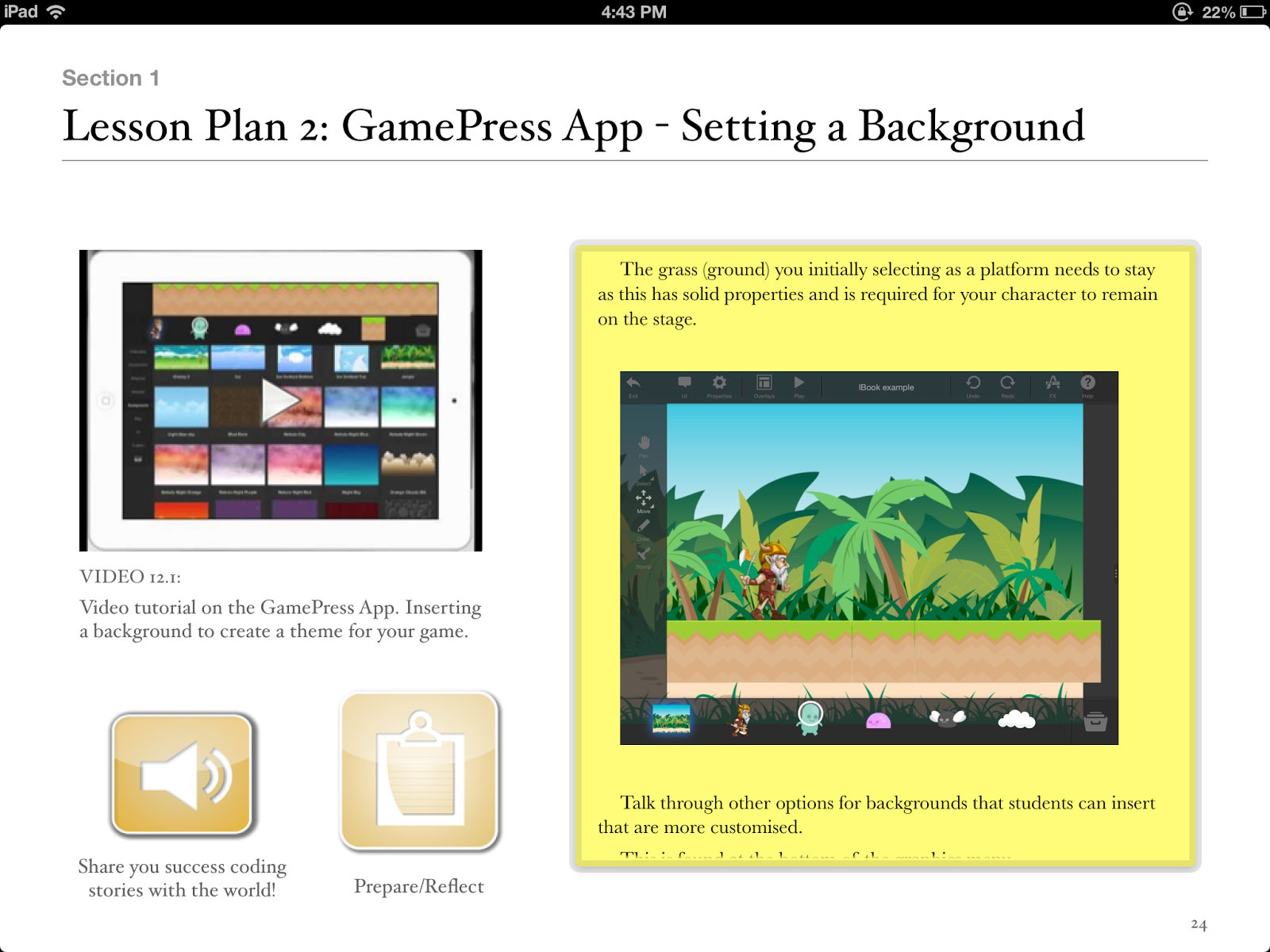
Hopscotch App Lesson Plan

Using the Hopscotch App to develop thinking processes

Students learn the language of code, developing a range of thinking skills.


Lesson Plan

Introduce learning intention:
To expose students to the language (vocabulary) of Code. To create a simple digital application (Game) for others to enjoy.

Special note for teachers:

For students to discover they can learn through experimentation and trial and error. 
The Habit of risk taking is vital in learning new things and we can learn in a number of ways.
Create video tutorials online that allow student to view and learn at their own rate. This could be through tutorials for Hopscotch that you find online, tutorials that you create or your students create.

Teacher instruction:

Introduce Hopscotch App.
Demonstrate App and how you save your projects.
Discuss with students the functions of the iPad e.g tilt, shake........
Make clear with students we want to focus on learning new things and in different ways. The teacher doesn’t have all the knowledge.
Introduce the “3 before me” concept where student must ask 3 others before the teacher.
Teacher creates a basic tilt game where the character moves up, down, left and right by titling the iPad.

Student Steps:

1. Allow discovery time (approx 4 lessons). This promotes risk taking with no set project in minds to discover all the functions. Students can trial, relearn, make mistakes and discover that they are in control of their learning.
2. Plan the game through pictures and a storyboard.
3. Game development.
4. Students review initial plan. It is it achievable/realistic? Should I scale back? Should I expand my game?
5. Partner students with others. Partner offers feedback. What works? Doesn’t work from a players perspective?
6. Students create games and have a gaming expo where they invite other classes, teachers and parents to play games.
Reflection:
What did I like about my game?
What would I change next time?
What did the players think of my game?
Did I enjoy making the game? Where could I go to learn more about coding”

Excerpt From: Hamilton, Paul. “10 amazing lessons for the iPad Classroom.” v1.1. Paul Hamilton, 2013. iBooks. 
This material may be protected by copyright.

Check out this book on the iBookstore: https://itunes.apple.com/au/book/10-amazing-lessons-for-ipad/id668251958?mt=11

Tuesday, 9 July 2013

appsbypaulhamilton youtube channel

We are about to hit 40,000 views and 300 subscribers. Don't hesitate to pass on the website to other educators out there using iPads on the classroom. Thanks everyone. http://www.youtube.com/user/appsbypaulhamilton/videos

Friday, 5 July 2013

iBook for the iPad classroom hits no1

Thanks to all the support. Proud to announce 10 amazing lessons for the iPad classroom has been top of the Computing and Internet category on the iBook Store (Australian Store) since its release.
Hopefully teachers are getting lots out of it and the students in their classrooms more engaged!!